 DelDebt
More: what's inside, how to print and how the plan is calculated
What's inside
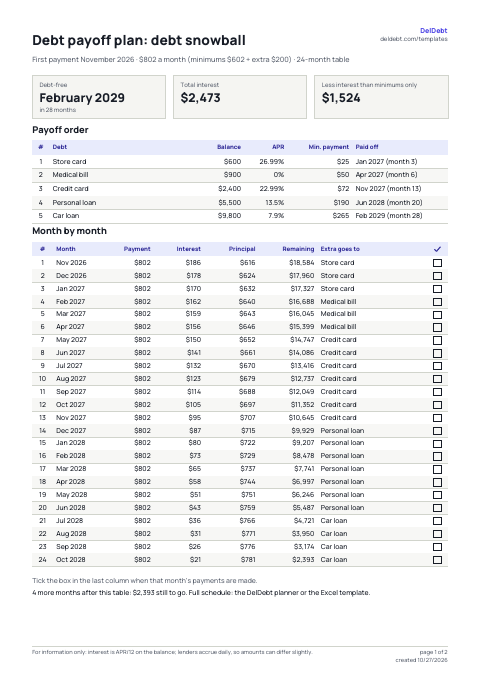
- Payoff plan. Page one has the headline numbers: when you'll be debt-free, total interest, and how much less that is than paying only the minimums. Then the payoff order: which debt goes first and in which month. Then a 12-, 24- or 36-month table: payment, interest, principal, total balance and where the extra money goes. The last page is a debt-free chart: 100 squares, each one 1% of your total debt.
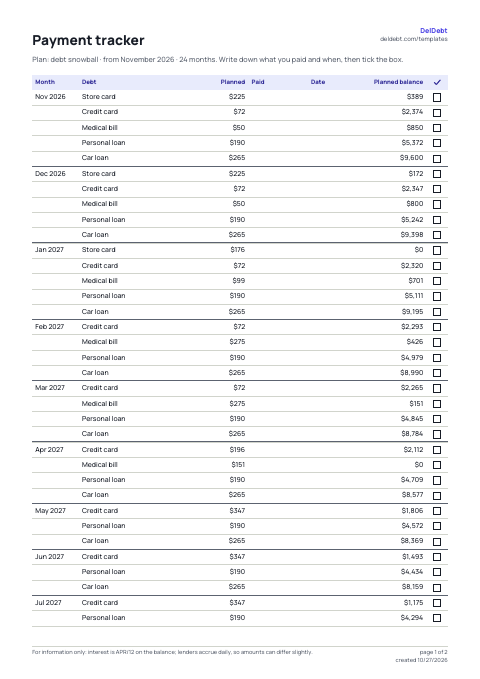
- Payment tracker. For each month, a row for every debt that gets a payment that month: the planned amount and the balance after it. Blank columns are for what you actually paid and when; the box on the right is your check mark.
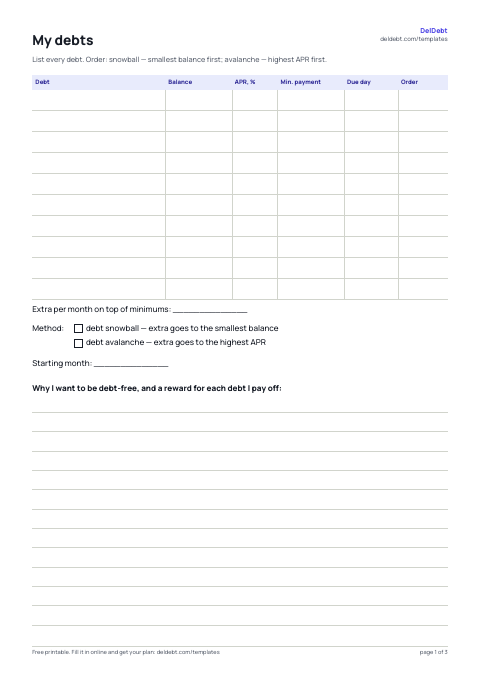
- Blank worksheets. Three pages with no numbers: “My debts” (up to 10 debts, extra amount and method), a payment tracker and the 100-square chart. Handy if you'd rather work it out on paper or print ahead.
How to print
- Paper size. Choose Letter or A4 before you download. Margins are built in; in the print dialog pick “Actual size” or 100%, not “Fit to page”.
- Black and white. Switch Print to Black & white: table headers turn gray and text black, with no color fills. Better for laser printers and photocopies.
- File names. Each file name has the template type, method and date, so printouts from different months don't get mixed up.
How the plan is calculated
- Every month. Each debt accrues interest at APR/12 on its balance and gets its minimum payment; the extra money goes to one debt: the smallest balance (snowball) or the highest APR (avalanche).
- When a debt is paid off. Its minimum doesn't disappear. It's added to the extra and rolls into the next debt in line, so each debt after the first goes faster.
- Same engine. The DelDebt planner, the Excel template and the calculators in our guides use the same math, so the numbers match. Lenders accrue interest daily, so a given month can differ by a few dollars.
Want a sheet that recalculates itself? There's a free debt snowball and avalanche spreadsheet with the same math in formulas.
FAQ
Is it really free with no signup?
Yes. The templates are built right on this page, with no account and no email. There's no download limit.
Where do my numbers go?
Nowhere. The PDF is built in your browser; your debts aren't sent to our server or stored anywhere. “Use my debts from the planner” only reads debts already saved in this browser by the DelDebt planner.
Snowball or avalanche?
The avalanche usually saves more interest. The snowball pays off the first debt sooner, which helps many people stick with the plan. Download both and compare the interest on page one. More in our guide to which debt to pay off first. Read the guide.
Why is the table shorter than my payoff time?
The month-by-month table covers the 12, 24 or 36 months you pick, so it's easy to pin up and tick off. If your debts take longer, the line under the table says how many months are left and what the balance will be.
How many debts can I add?
Up to 10. Debt names are only visible to you and printed in the file.
Can I track payments without paper?
Yes, in the DelDebt planner: mark a payment and the plan updates itself, with due dates and reminders. It's free too, and without an account your debts stay on your device.